
Global Configuration
The global configuration panel is used to manage VoceSpace system settings.
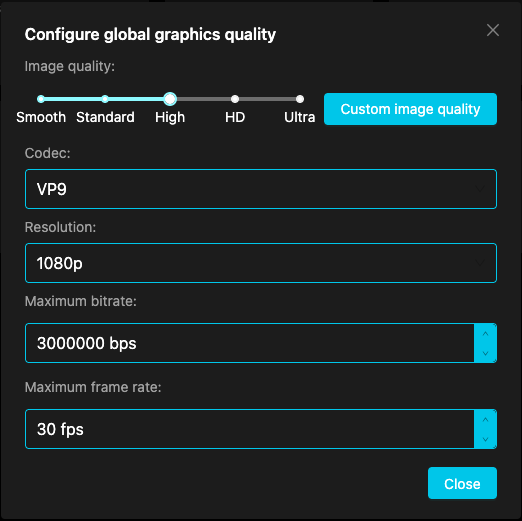
Accessing Global Configuration
In the Dashboard home page action menu, click "Global Configuration" to open the configuration panel.
Configuration Items
Audio/Video Configuration
| Setting | Description | Options |
|---|---|---|
| Codec | Select video encoding format | vp9 / vp8 / h264 / av1 |
| Resolution | Set video resolution | 720p / 1080p / 4k |
| Max Bitrate | Limit maximum video bitrate, affecting quality and bandwidth | Numeric value, e.g., 3000000 |
| Max Framerate | Set maximum video framerate | Numeric value, e.g., 30 |
| Priority | Transmission priority during network congestion | high / medium / low |
Configuration example:
TURN Server Configuration
| Setting | Description |
|---|---|
| URLs | TURN server address array |
| Username | TURN server authentication username |
| Password | TURN server authentication password |
Configuration example:
TURN servers are used to establish P2P connections in NAT/firewall environments.
AI Configuration
| Setting | Description | Example Value |
|---|---|---|
| Enabled | Whether to enable AI features | true / false |
| API Key | Access key for the AI service | xxxx |
| API URL | Interface URL of the AI service | xxxx |
| Model | AI model name in use | qwen3-omni-flash |
| Max Tokens | Maximum output length for AI analysis | 4000 |
Configuration example:
Create Space Policy
| Policy | Config Value | Description |
|---|---|---|
| All Users | all |
Any user can create new spaces |
| Authenticated Only | authenticated |
Only authenticated users can create new spaces |
| Whitelist Mode | whitelist |
Only users in the whitelist can create new spaces |
| Disabled | none |
Disable new space creation |
Configuration example:
Whitelist mode also requires configuring the user list:
Complete Configuration Example
Notes
- Configuration changes take effect immediately without restarting the server
- Keep your credentials secure and do not commit them to public code repositories
- It is recommended to back up your current configuration before making changes
Table of Contents