
Home
Home is the core view of the Dashboard, where you can view the status of all active spaces and participants in real time.
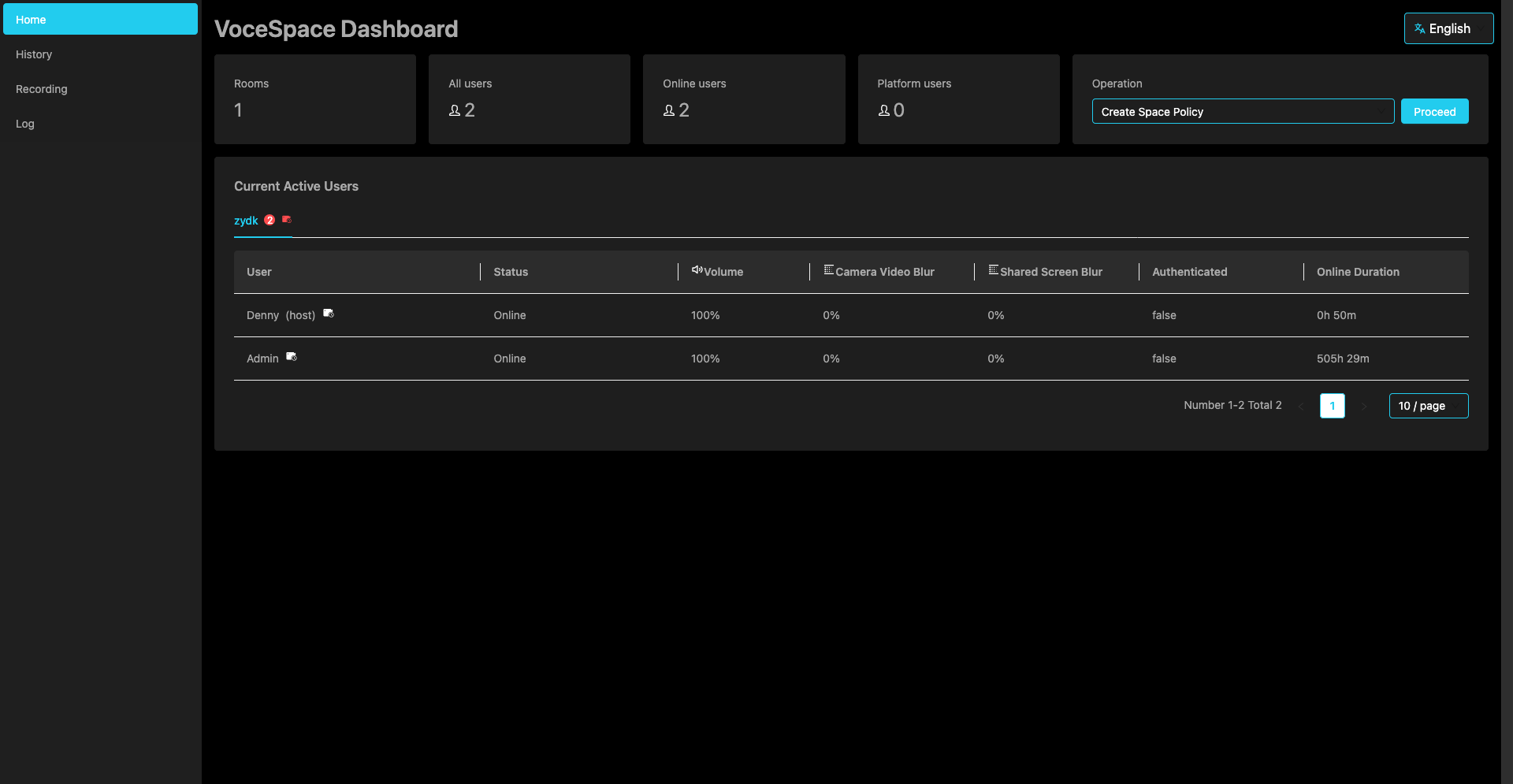
Statistics Cards
Five key metrics are displayed at the top of the page:
| Metric | Description |
|---|---|
| Active Spaces | Number of spaces with users currently online |
| Total Participants | Total number of users across all spaces |
| Online Participants | Number of users currently online |
| Authenticated Participants | Number of users logged in via platform authentication |
| Active Recordings | Number of spaces currently recording |
Action Menu
There is an action dropdown menu on the right side of the statistics cards, providing the following functions:
Refresh Data
Manually refresh all statistics on the page. The system automatically refreshes every 2 minutes by default.
Global Configuration
Open the global configuration panel to modify the following settings:
Audio/Video Configuration
| Setting | Description | Example Value |
|---|---|---|
| Codec | Select video encoding format | vp9 / vp8 / h264 / av1 |
| Resolution | Set video resolution | 720p / 1080p / 4k |
| Max Bitrate | Limit maximum video bitrate, affecting quality and bandwidth | 3000000 |
| Max Framerate | Set maximum video framerate | 30 |
| Priority | Transmission priority during network congestion | high / medium / low |
TURN Server Configuration
| Setting | Description |
|---|---|
| URLs | TURN server address array |
| Username | TURN server authentication username |
| Password | TURN server authentication password |
TURN servers are used to establish P2P connections in NAT/firewall environments.
AI Configuration
| Setting | Description | Example Value |
|---|---|---|
| Enabled | Whether to enable AI features | true / false |
| API Key | Access key for the AI service | xxxx |
| API URL | Interface URL of the AI service | xxxx |
| Model | AI model name in use | qwen3-omni-flash |
| Max Tokens | Maximum output length for AI analysis | 4000 |
Create Space Policy
| Policy | Description |
|---|---|
| All Users | Any user can create new spaces (all) |
| Authenticated Only | Only authenticated users can create new spaces (authenticated) |
| Whitelist Mode | Only users in the whitelist can create new spaces (whitelist) |
| Disabled | Disable new space creation (none) |
In whitelist mode, you can enter allowed user IDs line by line in the text box, for example:
Configuration changes take effect immediately without restarting the server.
Database Cleanup
Clear all data in the Redis database.
Warning: This operation will clear all space data, chat records, user states, etc. Please confirm before proceeding.
Steps:
- Enter Host Token to verify your identity
- Click the confirm button
- The system automatically refreshes page data after cleanup